
Your smartphone is the biggest threat to your progress in the squat rack. Most fitness tools treat your training like a social event, but real growth happens in the zone. You need a dedicated offline workout tracker app ios that values your time. Apps that freeze mid-set or drain your battery with constant cloud syncing are momentum killers. You deserve a tool that works in a basement powerlifting gym just as well as it does on a mountain trail.
We agree that the gym floor is no place for loading spinners or distracting feeds. This guide shows you why offline-first tracking is the secret to total gym focus. You will discover how to choose an iOS tool that offers zero-latency logging and ironclad data reliability. We are stripping away the digital noise to focus on high-performance utility. We will preview the best ways to ensure your gains are captured instantly, even on the latest watchOS 26.5 hardware. It is time to log your progress without the friction.
Key Takeaways
- Stop fighting the loading spinner. Learn how local device logging eliminates mid-set app freezes and protects your training momentum.
- Master zero-latency tracking. Find out why a dedicated offline workout tracker app ios is the secret to staying focused on the barbell.
- Cut the social noise. Identify the hidden costs of “free” apps and choose a minimalist tool that prioritizes your personal records over social feeds.
- Achieve total gym freedom. Use your Apple Watch as a standalone tracker with haptic alerts to keep your rest periods sharp and your phone in the locker.
- Secure your progress. Discover how Weights Pro offers a high-performance, zero-bloat interface that logs your gains instantly, even without a signal.
What is an Offline Workout Tracker App for iOS?
An offline workout tracker app ios is a high-performance utility built for the serious lifter. It stores your training data directly on your iPhone hardware. This removes the need for a constant internet connection. Most fitness apps stutter the moment you enter a basement weight room. A dedicated offline tool stays responsive. It captures every set, rep, and rest interval without hesitation. You get the speed of a paper log with the intelligence of a modern database. It is about removing every barrier between you and your data.
Kill the spinning wheel for good. Real-time cloud dependencies are a performance bottleneck in the gym. When you are deep into a high-intensity session, you don’t have time to wait for a loading icon. Local storage ensures your data is safe even in cellular dead zones. This focus on core metrics keeps you locked in. You track what matters: volume, intensity, and recovery timers. No external pings. No distractions. Just results. You own the session, and your phone simply records the victory.
Mastering what is physical fitness requires a long-term view of your data. You cannot improve what you don’t measure accurately. An offline app provides the reliability needed to maintain that record for years without a single missed entry. It ensures that your training history is always available, even when the world around you is disconnected.
Why Offline Reliability is a Gym Essential
Gym basements and concrete walls kill signals. They are the primary reason cloud-first apps fail mid-workout. If your tracker requires a 5G connection to save a heavy set, you will lose data. Offline logging solves this problem instantly. It also saves your battery life. Your phone stops searching for a weak signal and focuses on your log. This prevents sync errors that happen when a connection drops mid-entry. Your data stays local, clean, and accurate. Reliability isn’t a luxury; it is a requirement for serious progress.
Local Storage vs. Cloud Syncing
Local databases offer instant haptic feedback. You tap the screen and feel the confirmation vibration immediately. There is no delay. This zero-lag interaction keeps your rest periods precise and your momentum high. iCloud still has a role to play. It syncs your data to your other devices once you are back online. This hybrid approach gives you the best of both worlds. You get local speed during the lift and reliable backup for the long term. Your training data stays on your hardware where it belongs. It is faster, safer, and more efficient than any cloud-only alternative.
Why Zero-Latency Logging Beats Cloud-First Apps
Performance isn’t just about what you do under the bar. It is about how you manage your recovery and focus between sets. Speed is a performance metric. Every second you spend fighting a lagging interface is a second stolen from your recovery time. You need an offline workout tracker app ios that moves at the pace of your heart rate. Cloud-first apps are built on a flawed premise. They prioritize the server’s needs over the lifter’s momentum. If you have to wait for a loading spinner to save a personal record, the app has failed you. Aim to log your set and get back to the iron in under three seconds. This level of efficiency is the gold standard for high-level training.
Consistency breeds results. A local app provides predictable performance regardless of your environment. It responds with the same lightning speed in a high-tech commercial gym or a remote garage. You avoid the “social trap” that plagues modern fitness software. Notifications and community feeds are the enemies of progressive overload. They pull your attention away from the data that matters. While some claim social motivation is essential, it often just adds digital friction. Real growth is fueled by measurable data and intense focus. Choosing a tool that values your time is the first step toward a superior session.
The Psychology of Gym Focus
Flow state is your greatest asset in the weight room. A minimalist UI keeps you focused on heavy lifting instead of navigating menus. You eliminate decision fatigue by using a tool that tracks your history without judgment. Your tracker should suggest your next move based on your last set, not show you a friend’s morning shake. This total presence amplifies the mental health benefits of exercise by allowing for true disconnection from the digital world. Gym flow is a state of uninterrupted physical and mental exertion.
Technical Efficiency in 2026
Modern hardware demands better software. Our current tech leverages iOS 19+ optimization to handle local processing for instant charts and PR tracking. Minimalist codebases load faster and crash less than feature-heavy giants. You get high-speed utility without the bloat of unnecessary social integrations. Discover how to use an exercise tracker to hit your peak performance by selecting tools that prioritize local data over cloud-first architecture. If you are ready for a zero-friction experience, check out the Weights App to keep your momentum high.
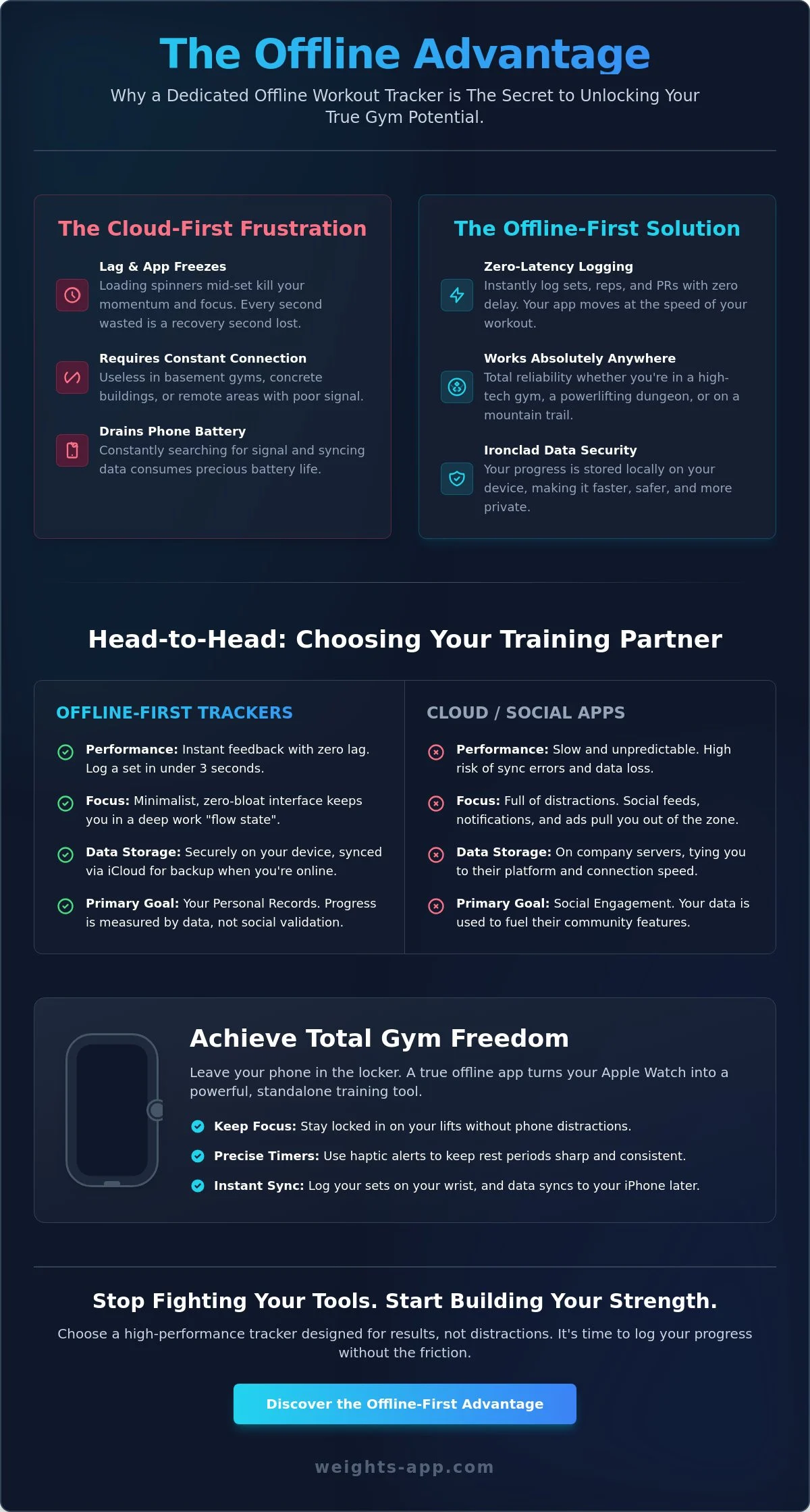
Minimalist Tracking vs. Social Bloat: Choosing Your Strategy
Cut the digital noise. Most fitness tools today are social networks disguised as utilities. You must decide if you are training for likes or for personal records. A high-performance offline workout tracker app ios prioritizes your data over your social reach. It doesn’t care about your friends or your feed. It cares about your next set. This distinction is critical for anyone serious about growth. You need a tool that functions as a silent partner, not a noisy distraction. Choose the path of performance over the path of popularity.
“Free” apps carry a heavy price. Many competitors hide their offline functionality behind a paywall, leaving you stranded in basement gyms. Others harvest your training data or bombard you with ads mid-workout. This is a direct threat to your focus. Evaluate your UI with a gym-floor test. Can you log a heavy superset with one hand while holding a 50lb dumbbell in the other? If the interface requires two hands and multiple taps, it is poorly designed. Efficiency is the only metric that matters when your heart rate is redlining. Before committing to any single tool, reviewing the best apps for working out at the gym gives you a clear benchmark for what speed and reliability should actually look like.
Investing in your tools pays dividends. Subscription fatigue is a real barrier to long-term consistency. Choosing a model like Weights Pro Lifetime wins for dedicated athletes. You pay once and own your progress forever. No monthly pings. No recurring fees. Just a permanent, high-speed tool for your arsenal. It is a one-time investment in a lifetime of measurable gains. Stop renting your data and start owning it.
The Feature Checklist for Serious Lifters
Serious lifters need specific, high-utility tools. Look for custom routine creation first. You need the flexibility to build PPL, Upper/Lower, or specialized splits without friction. Visual progress is equally vital. You want instant charts that show volume growth over months, not just daily snapshots. Master your training with a workout routine planner that keeps the focus on the data. If the app can’t visualize your progressive overload instantly, it isn’t helping you grow.
Red Flags in Gym Apps
Spot the bloat before it kills your session. Mandatory social login is a massive red flag. It suggests the app values your data more than your workout. Unnecessary animations are another momentum killer. You don’t need visual fluff; you need speed. This shift toward simplicity is part of the broader digital minimalism movement. Avoid aggressive upselling that interrupts your rest timer. If a paywall blocks your logging during a set, delete the app immediately. Your progress shouldn’t be held hostage by a subscription pop-up.
Optimizing Your Apple Watch for Offline Performance
Leave the phone in the locker. True gym freedom means logging your heavy sets directly from your wrist. When you use a high-performance offline workout tracker app ios, your Apple Watch becomes a standalone powerhouse. You no longer need to carry a bulky device between machines. You don’t have to worry about a stray plate crushing your screen. This setup allows for total immersion in your training. Focus on the barbell. Ignore the digital noise. The watch handles the data; you handle the iron.
Haptic feedback is your secret weapon for intensity. Stop staring at a countdown timer like a spectator. Feel a sharp vibration on your wrist the moment your rest period ends. This tactile cue keeps your momentum high and your heart rate in the target zone. It is a streamlined utility that respects your focus. Once you finish the session and move back into range, your data moves automatically. Reliability is the priority. Your gains are recorded locally on the watch first, then synced to the iPhone database for long-term analysis without any manual effort.
Battery life is a performance constraint you must manage. A two-hour heavy leg day can drain a watch if your settings are bloated. Optimize your hardware by disabling unnecessary background pings. Prioritize the logging database over social notifications. This ensures your device survives from the first squat to the final set of calf raises. Every detail of your setup should serve the goal of zero-friction logging. Efficiency is the only metric that matters when you are pushing for a new personal record. Before you step under the bar, make sure you know exactly how to calculate weight on a barbell so your logged numbers are always accurate. Pairing this approach with precision isolation work like lateral raises for elite shoulder width ensures every movement you log is backed by technical accuracy and measurable hypertrophy data.
Setting Up Standalone Mode
Success starts before you step into the rack. Ensure your routines are pre-loaded to the watch storage before you hit the gym floor. This step is vital for true offline reliability. Open the app on your iPhone and verify the sync is complete. Disable unnecessary background pings to prioritize the logging database and save power. Test the sync by logging a dummy set and checking your phone. Once verified, you are ready for a distraction-free session. This is the ultimate way to stop guessing and start growing with a professional-grade log.
The Minimalist Watch Interface
Precision matters when your hands are sweaty and your grip is failing. The best watch interfaces use large, easy-to-tap buttons. You shouldn’t have to hunt for a small icon mid-set. Customize your complications for one-tap access to your daily workout. This allows you to start your session in seconds. If you want to experience the peak of watch-based logging, get Weights Pro Lifetime and leave the phone behind for good. It is the fastest way to track progress without the bloat of a smartphone screen.
Weights Pro: The Last Offline Gym Log You Will Buy
Weights Pro is the definitive offline workout tracker app ios for the serious athlete. It is built for speed. We engineered this zero-bloat interface by stripping away everything that doesn’t help you lift heavier. You get a high-performance utility that respects your time and your focus. Every interaction is optimized for the gym floor. There are no loading screens. There is no lag. It is just you, the iron, and your data. This is the streamlined partner your training has been missing.
Data integrity is our baseline. Weights Pro offers full offline capability where your training history lives on your device first. Cloud syncing happens in the background only when you are back online. This ensures your progress is never held hostage by a weak signal. Visual power is at your fingertips. You can transform raw numbers into actionable growth charts instantly. Watch your volume trends and 1RM estimates evolve over months of hard work. You get the clarity needed to make informed adjustments to your programming. Understanding your strength level benchmarks alongside this data gives you the objective standards needed to know exactly where you stand and what to target next.
Commitment deserves flexibility. We offer three tiers to fit your training lifestyle. Choose Weights Pro Monthly for short-term intensity. Step up to Weights Pro Yearly for a dedicated calendar of growth. For the ultimate value, select Weights Pro Lifetime. It is a one-time investment in your permanent training record. No recurring fees. No expiration date. Just a lifetime of measurable gains and zero-friction logging.
No Ads, No Social, No Noise
Focus on what matters. Weights Pro has no social feeds, no ads, and no digital noise. You track your sets, reps, and weight without being tracked by an algorithm. Custom exercises are at the core of the experience. You can add any movement with zero restrictions. Whether you are doing specialized rehab work or old-school strongman lifts, the app adapts to you. Privacy-first architecture means your training data belongs to you alone. It is your progress; keep it that way.
Get Started with Weights Pro
Momentum starts now. Download the app from the App Store and create your first routine in under 60 seconds. The interface is intuitive enough to use during a heavy session without a learning curve. Upgrade to Pro to unlock unlimited routines and advanced data visualization. It is time to stop using tools that distract you and start using a tool that empowers you. Start tracking your gains with Weights Pro today and experience the peak of offline performance.
Master Your Momentum and Log Every Set
Your training history is too valuable to leave to chance. Most fitness tools fail the moment you step into a basement gym, but your progress shouldn’t depend on a cellular tower. You now understand that a dedicated offline workout tracker app ios is the only way to ensure total data integrity in any environment. By prioritizing zero-latency logging and standalone Apple Watch performance, you protect your focus. You eliminate the friction that stops most lifters from reaching their true potential.
Weights Pro delivers the high-speed utility required for serious growth. It is engineered for peak iOS 19 and 20 performance, maintaining a 4.8+ App Store rating by focusing on what matters. You get zero social distractions and a clean interface that responds instantly to every tap. Stop fighting with lagging cloud-first apps and start using a tool built for the iron. It is time to turn your hard work into measurable results without the digital noise.
Build your first routine and track your gains with Weights Pro today. Own your data. Own your progress. Keep pushing for that next personal record.
Frequently Asked Questions
Does the Weights app work without an internet connection?
Yes, the Weights app is a dedicated offline workout tracker app ios designed to function perfectly without a signal. Your data is stored locally on your device hardware first. This ensures zero lag and prevents the spinning wheel frustration often found in cloud-dependent tools. Log your sets in basement gyms or remote locations with total confidence.
Will my data sync to my other iOS devices once I’m back online?
Yes, your data syncs automatically via iCloud once you regain a stable connection. This hybrid approach gives you the speed of local storage during the session and the security of cloud backup afterward. You get a seamless experience across your iPhone and iPad without any manual effort or data entry friction.
Can I use the Weights app on my Apple Watch without my iPhone nearby?
Yes, you can log workouts directly on your Apple Watch in standalone mode. Leave your iPhone in the locker and focus entirely on the barbell. The watch app captures your sets and reps locally; it then syncs that data to your phone database once the devices are back in range.
Is there a one-time purchase option for the Weights app?
Yes, we offer Weights Pro Lifetime as a one-time purchase for permanent access to all premium features. This option is ideal for dedicated athletes who want to avoid subscription fatigue and own their tools. You pay once and secure the best offline workout tracker app ios experience for the long haul.
How do I export my workout data if I want to use it elsewhere?
You can export your full training history directly through the app settings in a standardized format. We believe your data belongs to you, not the platform. This feature allows you to move your raw numbers into spreadsheets for deeper personal analysis or long-term archiving whenever you choose.
Does this app include social features or a community feed?
No, the app is strictly a high-performance utility with zero social bloat or distracting community feeds. We prioritize your focus and privacy over social engagement. This removal of digital noise ensures that your time in the gym is spent training; it isn’t spent scrolling through other people’s workouts.
Can I track custom exercises that aren’t in the default library?
Yes, you have total flexibility to create and track custom exercises with zero restrictions. You can add any movement to your routines to match your specific training splits or unique gym equipment. This allows for a completely personalized logging experience that grows with your athletic needs.
What happens if my phone dies during a workout I’m logging offline?
Your logged sets are safe because the app saves data to the local database the moment you enter it. If your phone powers down mid-session, the sets you already recorded remain secure. You can review your progress or resume your routine as soon as you recharge your device.
Ready To Get Started?
Everything you need. Nothing you don’t.
Weights adapts to your goals today and scales with the strength you’ll have tomorrow.