The best gym app is the one that disappears during your set and delivers actionable data the moment you rack the bar. Stop wasting your rest periods fighting a clunky interface or scrolling through a distracting social feed. Finding the best apps for working out at the gym shouldn’t be a workout in itself. You’re there to move weight. Your phone should be a silent partner, not a digital speed bump. Eliminate the friction of losing data or tapping through endless menus just to log one heavy set of squats.
You deserve clear charts that show real strength gains and a reliable database for your custom exercises. It’s time to stop guessing and start tracking with precision. This definitive roundup categorizes the top-performing tools by training style. We’ve stripped away the fluff to focus on speed, reliability, and data-driven results. Whether you’re chasing a new one-rep max or building a foundation, you’ll find the perfect tool to map your progress and keep your momentum high.
Key Takeaways
- Reclaim your focus by ditching apps with distracting social feeds. Learn why a minimalist interface is the ultimate performance enhancer for serious lifters.
- Master the Two-Tap rule for logging. Identify the best apps for working out at the gym that prioritize entry speed so you never lose your rhythm between sets.
- Match your technology to your training style. Discover the specific tools built for minimalist strength athletes versus those designed for deep-dive data analysis.
- Eliminate decision fatigue before you hit the floor. See how pre-building routines and using templates ensures your digital log keeps pace with your training intensity.
- Turn raw numbers into visual proof of progress. Learn to leverage clear strength charts that highlight your gains and keep your motivation high.
Beyond the Social Feed: Why Your Gym App Should Prioritize Focus
Your gym time is a finite resource. Don’t waste it scrolling. Many of the best apps for working out at the gym have traded utility for engagement. They want you looking at your screen, not the barbell. This is the distraction cost of modern software. “Free” apps often rely on aggressive ads or data harvesting to survive. Every pop-up ad breaks your momentum. Every data-mining permission compromises your privacy. You’re the product, not the athlete.
Social feeds in a fitness app are a performance tax. They encourage comparison instead of concentration. You’re there to hit a PR, not to see what a stranger in another time zone did for cardio. These features lead to longer rest periods and lower heart rates. Real gains happen in the flow state. This is a psychological zone where you’re fully immersed in the physical task. A social feed kills that immersion instantly. It pulls you out of the weight room and into a digital vacuum.
Distinguish between coaching apps and tracking apps. Coaching apps tell you what to do. They’re often filled with video content and “influencer” routines. Tracking apps record what you’ve done. If you’re a serious lifter, you need a high-performance log. You need a tool that prioritizes execution over instruction. The best apps for working out at the gym stay out of your way until the set is over.
The Distraction-Free Training Philosophy
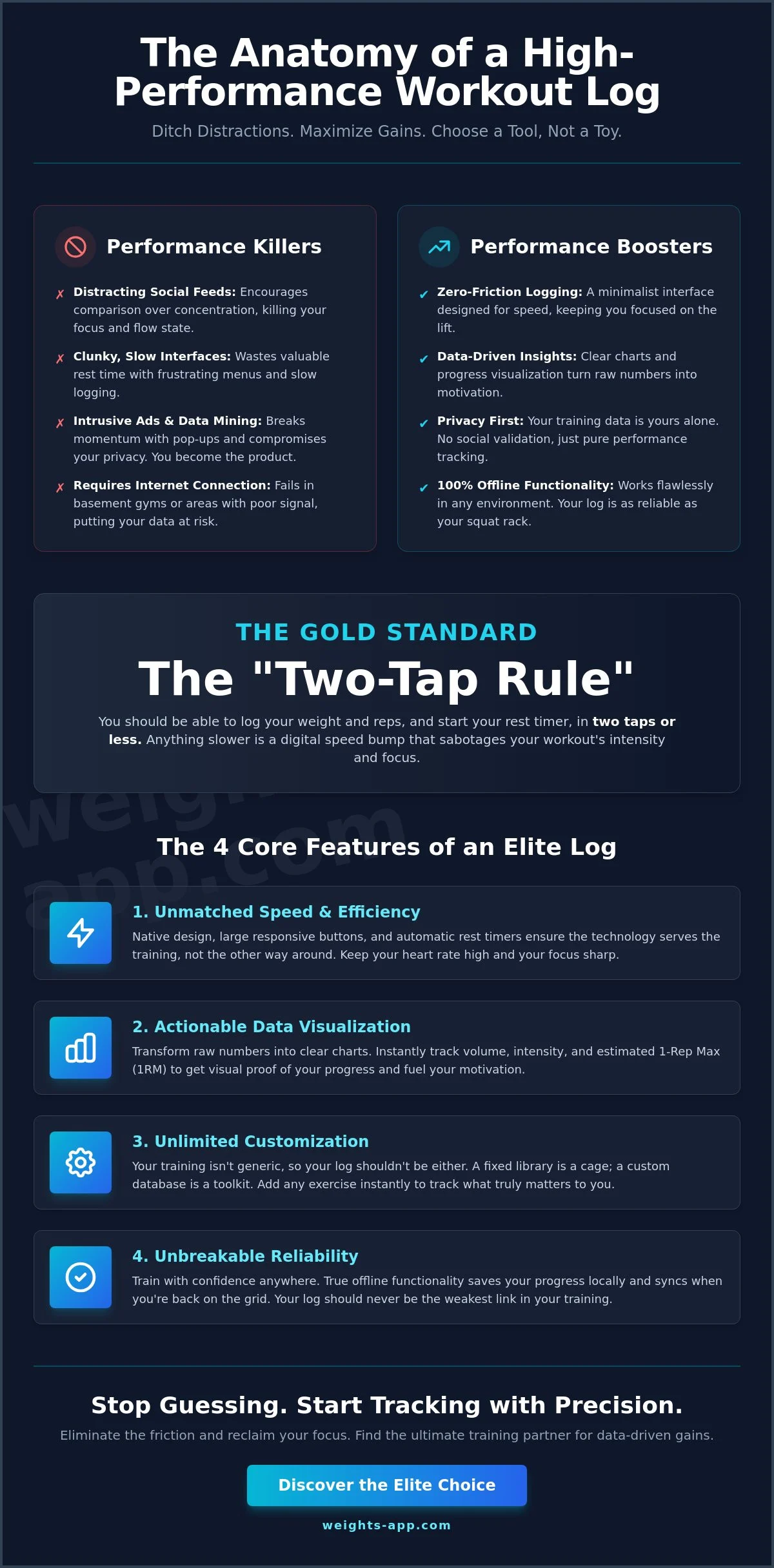
Zero-friction logging is the gold standard. It means recording a set in two taps or less. This keeps your head in the game. Minimalist interfaces prevent the urge to check notifications during your rest. If an app looks like a spreadsheet and acts like a stopwatch, it’s working. It should feel like an extension of your workout, not a separate activity.
Reliability matters in every environment. Many hardcore lifters train in basement or warehouse gyms. These dead zones often lack consistent Wi-Fi or cellular service. Your log must work offline. If your data depends on a cloud connection mid-set, you’re using a fragile system. A robust app saves your progress locally and syncs when you’re back on the grid.
Why Data Accuracy Trumps Social Validation
Numbers don’t lie. Community likes won’t add ten pounds to your bench press. Clean data is the only way to calculate progressive overload accurately. If your log is cluttered with social noise, you’ll miss the subtle trends in your volume and intensity. You need precision, not applause.
- Focus on PRs: Track your personal bests without the noise of a leaderboard.
- Clean Analytics: Use raw data to identify when to increase weight or deload.
- Privacy First: Keep your training data between you and your log.
A dedicated tracking tool builds raw strength while a social feed only builds digital ego.
Evaluating Performance: The 4 Core Features of a High-Tier Workout Log
Speed is the ultimate gym-floor currency. If you’re fumbling with a clunky interface, you’re losing the mental edge required for a heavy set. The best apps for working out at the gym prioritize engineering over aesthetics. They follow the “Two-Tap” rule: you should be able to log your weight and reps and start your rest timer in two seconds or less. Anything slower is a digital speed bump. High-tier logs treat your time as a precious resource, ensuring the technology serves the training, not the other way around.
Raw numbers are just noise without visualization. A premium log transforms your training history into actionable growth charts. You need to see your volume trends and estimated one-rep max (1RM) improvements at a glance. This immediate feedback loop fuels motivation. It proves your program is working. Beyond tracking, customization is a non-negotiable requirement. Your training isn’t generic, so your app shouldn’t be either. If you perform niche movements like the Z-Press or specific cable variations, you must have the ability to create custom exercises instantly. A fixed library is a cage; a custom database is a toolkit.
Interface Speed and UX Efficiency
Sweaty hands and high heart rates demand tactical design. Large, responsive buttons and haptic feedback ensure your inputs are registered the first time. Native iOS development is superior here. Unlike cross-platform web-wrappers that feel sluggish, native apps leverage the full power of your device for instant response times. Automatic rest timers are another essential. They should trigger the moment you log a set, keeping your recovery periods disciplined and your session on track. For those who want this level of precision, Weights Pro offers a streamlined, native experience built for speed.
Long-Term Data Integrity and Syncing
Your training history is an asset. Losing years of data because of a device switch or a software glitch is unacceptable. This is where iCloud sync becomes a critical feature. It provides a seamless, secure backup that lives with your Apple ID, not on a third-party server. Performance data should also be portable. Look for export options like CSV or JSON files. This ensures you own your data forever, regardless of the app’s future updates.
Evaluate the “History” tab before committing to a tool. It should allow for rapid reference during a session. You need to know exactly what you lifted last week without digging through menus. Finally, consider the value of a lifetime access model. Recurring subscriptions add up over years of training. A one-time investment in a high-quality tool often provides better long-term value and peace of mind. Data persistence and privacy are the foundations of a serious digital training log.
The Best Apps for Working Out at the Gym Categorized by Training Style
Your goal dictates your gear. A powerlifter needs different data than a casual weekend warrior. The best apps for working out at the gym align with your specific training philosophy. Don’t settle for a generic solution that clutters your workflow with features you’ll never use. Choose the tool that matches your intensity. Speed, data depth, and guidance are the three pillars of a digital log. Identify which one you prioritize before you hit the App Store.
The Minimalist Choice: Weights app is built for pure logging speed. It strips away the noise to focus on your lifts. The Data Scientist Choice: Apps like JEFIT offer deep volume tracking and 1RM history for those who love spreadsheets. The Socialite Choice: Community-driven platforms appeal to those who find motivation in gamified feeds and shared routines. The Beginner Choice: AI-guided planners like Fitbod provide a starting point for those without a set program.
Top Picks for Strength and Hypertrophy
Serious strength training requires a streamlined approach. Weights app excels here with an iOS-first design that feels native and fast. It prioritizes your focus by removing the social fluff found in other platforms. If you crave data-heavy spreadsheets, JEFIT is a long-standing standard for detailed tracking. It allows for deep dives into historical volume. For athletes who prefer leaving their phone in the locker, SmartGym offers impressive Apple Watch autonomy. It lets you log entire sessions directly from your wrist without tethering you to a handset.
Best Options for Guided Routines and AI
Not everyone arrives at the gym with a plan. Fitbod uses an algorithm to generate workouts based on your available equipment and recovery state. It’s an efficient way to avoid decision fatigue when you’re short on time. For those who need visual cues, Nike Training Club provides high-quality video guidance for hundreds of movements. These tools act as a digital coach. However, if you already have a proven program, these “smart” features can become obstacles. The best apps for working out at the gym for experienced lifters stay out of the way. Weights app remains the superior choice for those who have a plan and just need to execute. It provides the structure without the interference. Lock in your routine and let the app handle the math. If you’re evaluating popular alternatives and want a focused breakdown, our Hevy vs Strong app comparison cuts through the noise to identify which workout log truly protects your gym-floor focus.
Maximizing Efficiency: How to Set Up Your Digital Training Log for Speed
Stop guessing. Start executing. Transitioning from a paper log to a digital one is about more than just saving trees; it’s about optimizing your workflow for maximum intensity. The best apps for working out at the gym only reach their full potential when you configure them for zero friction. If you’re deciding on your next exercise while standing in the squat rack, you’ve already lost your momentum. Systematic preparation is the difference between a productive session and a wasted hour.
Eliminate decision fatigue by pre-building your routines. Your brain should be focused on the lift, not the interface. Use “Template” features to mirror your specific training split, whether it’s a classic Push/Pull/Legs (PPL) or a specialized Upper/Lower divide. Setting up automatic rest timers ensures consistency across every session. It keeps your heart rate in the target zone and prevents the “accidental five-minute break” caused by phone distractions. Consistency in rest is just as vital as consistency in weight.
Refine your logging by distinguishing between “Warm-up” sets and “Top” sets. Not every rep deserves the same level of analysis. Log your warm-ups to track total session volume, but save your focus for the top sets where the real growth happens. This tiered approach keeps your data clean and your history tab relevant.
Creating Custom Routines That Work
Organization is the foundation of speed. Name your sessions clearly by day or muscle group to find them in seconds. Don’t let a generic library limit your training. Add custom exercises for niche equipment like landmine attachments or specific rehab movements. This ensures your log is a perfect digital twin of your physical reality. For deeper insights on optimization, learn how to use an exercise tracker to sharpen your performance.
Leveraging Data for Progressive Overload
Data is your roadmap to growth. Use the “Previous Set” view to determine your next weight increment instantly. This removes the “mental math” that often leads to stagnant loading. Incorporate RPE (Rate of Perceived Exertion) to track how hard a set actually felt, providing context that raw numbers can’t offer. Progressive overload is the primary driver of muscle growth, achieved by consistently increasing the stress placed on the body during exercise. Tracking these incremental wins is the only way to guarantee long-term results. If you want to eliminate every ounce of gym-floor friction, our complete guide to finding the best app to log sets and reps walks you through mastering zero-friction logging for maximum training efficiency. To understand exactly where you stand against objective benchmarks, explore our complete guide to strength level standards and how to measure your gym progress against proven metrics.
Ready to streamline your strength goals? Upgrade your training with Weights Pro Monthly to unlock the fastest logging experience on the market.
Weights Pro: The Elite Choice for Minimalist Strength Training
Weights Pro wasn’t designed in a boardroom. It was forged on the gym floor. Most of the best apps for working out at the gym are built by developers chasing engagement metrics. Weights was built by a lifter chasing results. This distinction changes everything. You won’t find a social feed here. There are no “likes” to chase and no influencers to follow. Silence is the ultimate pro feature. It protects your focus and keeps your heart rate where it belongs: in the work. When you’re under the bar, you don’t need a community. You need concentration.
Data should be a weapon, not a chore. Weights Pro delivers high-precision charts that track your volume trends and estimated 1RM with clinical accuracy. These aren’t just aesthetic flourishes. They’re visual proof of your progress. You see the growth. You feel the momentum. In a world of endless monthly fees, Weights Pro Lifetime offers a rare exit strategy. One investment. Forever access. It’s a commitment to your long-term strength goals without the recurring subscription tax. Choose between Weights Pro Monthly, Weights Pro Yearly, or the permanent security of the Lifetime tier.
Streamlined iOS Integration
Performance is about stability. Weights Pro leverages native iOS design patterns for a fluid, lag-free experience that feels like a part of your phone. Your data belongs to you. Period. With robust iCloud sync, your training history is backed up automatically to your personal account. No third-party servers. No data harvesting. Privacy is baked into the code, ensuring your PRs stay between you and the iron. Visit the Weights app homepage to see the minimalist design in action and secure your data ownership.
Transitioning to Weights Pro Today
Speed defines your first session. You can build your first routine and start your first set in under 60 seconds. Don’t let cluttered interfaces or “free” ad-supported tools slow your tempo. The Premium Workout Tracker experience eliminates the myths that kill progress in bloated alternatives. It’s time to professionalize your log. Stop fighting your phone and start fighting the weight. Own your data. Master your metrics. Download Weights app and start logging your gains to experience the best apps for working out at the gym without the noise.
Master Your Metrics and Move More Weight
Take control of your progress with a system built for technical precision. Boasting a 4.8+ Star Rating on the App Store, Weights Pro is the gold standard for privacy-focused athletes. There are no ads to dodge and no social tracking to compromise your focus. You own your data. Secure your training history forever with our one-time Lifetime purchase option and start visualizing your path to a new PR today.
Get the Weights app on iOS and experience zero-friction logging.
The barbell is waiting. It’s time to outwork your yesterday.
Frequently Asked Questions
What is the best app for tracking gym workouts for beginners?
Beginners should prioritize simplicity and ease of use to build a consistent habit. While some apps offer complex AI coaching, a minimalist tracker like Weights app allows new lifters to focus on form and basic logging without being overwhelmed by data noise. It’s the ideal starting point for anyone who wants to record their lifts and see immediate progress charts.
Is there a workout app that doesn’t require a subscription?
Yes, several premium trackers offer a one-time payment model to avoid recurring fees. Weights Pro Lifetime is specifically designed for athletes who want to own their tool forever. This model provides full access to all pro features without the burden of a monthly or yearly subscription, making it a cost-effective choice for long-term training.
Do gym apps work without an internet connection?
High-performance gym apps are built to function locally on your device. This is a critical feature for training in basement gyms or warehouse facilities where cellular signals are often weak or non-existent. Your sets are saved to your phone immediately and will sync to your cloud storage once you return to a Wi-Fi zone.
How do I track progressive overload using a mobile app?
Use the “Previous Set” reference feature to ensure you are outperforming your last session. By seeing exactly what you lifted last week, you can make informed decisions to add weight or increase reps. This systematic approach is the most efficient way to use the best apps for working out at the gym to drive muscle growth and strength gains.
What is the most minimalist workout tracker for iPhone?
Weights app is engineered as the ultimate minimalist tool for iOS power users. It strips away distracting social feeds and intrusive advertisements to provide a “zero-friction” logging experience. This focus on speed makes it one of the best apps for working out at the gym for lifters who want to spend more time lifting and less time tapping.
Can I sync my gym data across multiple iOS devices?
Native iOS apps leverage iCloud to sync your training history across your entire Apple ecosystem. If you log a heavy session on your iPhone, that data is instantly available on your iPad for deeper review. This seamless integration ensures your data is always backed up and accessible whenever you need to analyze your performance.
Why should I use a dedicated gym app instead of the Notes app?
Dedicated apps automate the analytics that the Notes app simply can’t handle. A professional tracker provides automatic rest timers, 1RM estimations, and volume charts that visualize your progress over time. It transforms a static list of numbers into a dynamic roadmap for your strength journey, helping you identify and break through plateaus.
Are there gym apps that allow for custom exercise creation?
Professional-grade trackers always include a custom exercise feature to accommodate niche movements and rehab drills. You shouldn’t be limited by a pre-set library. Creating your own exercises allows you to track specific cable variations or specialized barbell work, ensuring your digital log is a perfect reflection of your actual training routine.
Ready To Get Started?
Everything you need. Nothing you don’t.
Weights adapts to your goals today and scales with the strength you’ll have tomorrow.